RF switching (Manual Adjustment)
Posted: Mon Dec 29, 2025 4:30 pm
DVW-500
Tools:
ZR2-1 00:00:00:00
S701-1 SS-52 board set to off
Pre Adjustment:
CH1 TP2502/SS-52
Ch2 TP103/EQ-45
CH3 TP819/SS-52 (TRIG)
Using RV700 adjust the level of the RF (TP2502) envelope to the highest point.
This should have been completed during the tape path and Tracking adjustment.
Eject tape
Adjustment
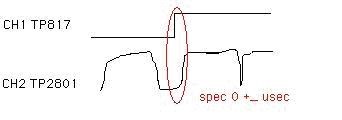
CH1 TP817/SS-52
CH2 TP2801/SS-52
Go to Maintenance mode A011: RF Switching and select Manual setup.
Play ZR2-1 tape
Turn the search dial, while holding the JOG button, to move the waveforms
together.
Tools:
ZR2-1 00:00:00:00
S701-1 SS-52 board set to off
Pre Adjustment:
CH1 TP2502/SS-52
Ch2 TP103/EQ-45
CH3 TP819/SS-52 (TRIG)
Using RV700 adjust the level of the RF (TP2502) envelope to the highest point.
This should have been completed during the tape path and Tracking adjustment.
Eject tape
Adjustment
CH1 TP817/SS-52
CH2 TP2801/SS-52
Go to Maintenance mode A011: RF Switching and select Manual setup.
Play ZR2-1 tape
Turn the search dial, while holding the JOG button, to move the waveforms
together.